
Training and demonstration programme: Information for trainers
Classroom Sessions
1. The Classrooms
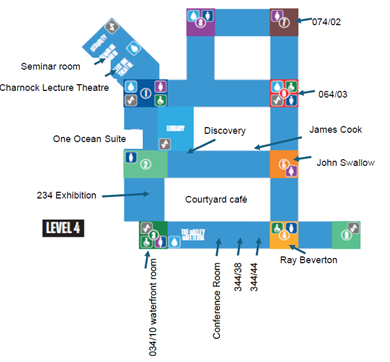
All classrooms are on Level 4:
| Facility Name | Floor | Layout | Capacity | Time to walk from bureau through exhibition (guidance only) |
| Ray Beverton Room 044/11 | 4th | Theatre | 24 | 4.5 mins |
| John Swallow Room 054/06 | 4th | Theatre | 24 | 5 mins |
| Meeting Room 344/44 | 4th | Theatre | 16 | 5 mins |
| James Cook Room | 4th | Theatre | 28 | 5 mins |
| Discovery Room | 4th | Theatre | 28 | 5 mins |
| Access Grid Room 124/14 | 4th | Theatre | 40 | 4 mins |
 Internet Connection
All classrooms have hard wired internet access. Instructions on how to use the internet will be provided in the room.
Equipment
Data projectors with screens or plasma screens are available in all rooms. The relevant leads to connect your laptop to the plasma / projector will be provided. Laptops are NOT provided in any of the rooms – you must provide your own.
Storage
During you session you can store boxes and packing cases in the room you are using. Please remove them when your session has finished.
2. Booking your clients onto your Training and Demonstration session(s)
All pre-booking of clients on to training and demo sessions must be managed by yourselves.
- Make sure your clients register themselves to attend the show via the Ocean Business website to avoid the queues onsite: www.oceanbusiness.com
3. Can I scan people into my session(s)?
Included in every exhibitor’s stand package is a lead capture app, you will be sent the details and download link for this closer to the show. We would strongly recommend you use your lead capture app to scan all visitors in attendance at your session so you can download their contact details at your earliest convenience.
4. Preparing for your Training and Demonstration session onsite
- When you arrive onsite, we recommend you familiarise yourself with the location of your classroom.
- Make your way to your session in good time. There are half hour gaps between the sessions, so you have plenty of time to set up/ dismantle.
- Welcome your guests into your session(s) and scan them in with your badge scanner app.
5. General information
- It is imperative that your demonstration keeps to time and that you leave your demonstration area tidy.
- By signing the Contract for Exhibit Space and the Training and Demonstration contract you have agreed to take out and maintain at all times a public liability and employee liability insurance.
- A voluntary code of conduct will be in place requesting companies do not attempt to attend training sessions of competitive technologies. Attendance will be restricted for competitors and will be at the discretion of the exhibitor who is providing the training.
6. Don’t forget to share your Training and Demonstration session(s) before the show
Attract the right visitors and fill your session to capacity by raising awareness of it in advance. The Ocean Business marketing campaign for the show and the programme is well under way. You can build on that momentum by inviting key clients and prospective business to come to your sessions.
- Add the details of your session(s) to your email footer
- Add the details of your session(s) to your website
- Email the details of your session(s) to your clients on a regular basis to encourage them to be there!
- Share the news on your personal LinkedIn account
- Send us news about your sessions for us to include in Oceanbuzz, by emailing [email protected]