
Training and demonstration programme: Information for trainers
Dockside sessions
1. Monday 7th April – Mobilisation of your kit
ACTION: If you need to mobilise your kit or view the dockside area before your session email Cheri as soon as possible. Once we have received your request we will add you to the mobilisation schedule so you can do it during build up on Monday 7 April.
2. Vessel Mooring Form and Risk Assessment form
ACTION: Please complete the NOC Vehicle Mooring Questionnaire by Monday 24th February.
ACTION: Complete the Exhibitor Training and Demonstration risk assessment by Monday 24th February. You will find a link to this in your Exhibitor Manual called “Training & Demonstrations” at the bottom of the manual homepage.
3. Important information about the Dockside Demo Areas
There are 2 dockside demo areas located here:
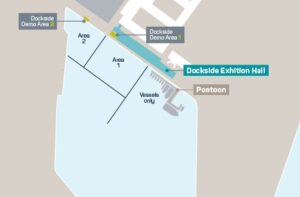
- Maximum capacity for each area is 30 people
- Dockside area 1 is approximately 3m x 10m. Dockside area 2 is approximately 5m x 10m.
- See the plan above for where your vehicle can be driven within the dockside for area 1 and 2
- For each area 2 plugs are provided as a basic power supply. Please email Cheri in advance of the event if you need more power than this.
- Seating and a table are provided in each area
- Only those responsible for launching and recovering the equipment are allowed out of the doors onto the dockside
- NOC will provide buoyancy aids for anyone working in this outdoor area. They must be worn at all times.
- Kit can be launched into the dockside waters via the pontoon or the dock edge. A lifejacket must be worn and necessary precaution taken.
- Vessels will be travelling within the dockside regularly. Please wait to recover or launch your equipment if needed.
- You can leave equipment in the dockside area during your session time. Please remove it when your session is finished.
- The depth of dockside waters is tidal dependant. A rough guide provided by the NOC is approximately 4m at low tide.
- If a session is cancelled due to inclement weather we will try to re-schedule it. If it can’t be rescheduled it is unfortunately not possible to offer a refund. Trainers are advised to take out additional insurance to cover this.
- Please note, strong sunshine may affect visitors ability to see presentations on the TV screen
- A screen, presenter table and seating will be provided in this area. Please note a laptop is NOT provided
VITAL INFORMATION ABOUT BOTH AREAS
- The only people that are allowed out of the doors onto the dockside are those responsible for launching and recovering equipment.
- Anyone working in this outdoor area MUST wear buoyancy aids which will be made available by the NOC.
- Your colleagues responsible for launching kit into the dockside waters can do so via the pontoon or via the dock edge but they must wear a buoyancy aid and take every precaution necessary.
- Vessels will be going out and coming back at regular intervals, please be sensible and if you need to wait to recover or launch your equipment, please do so.
- You cannot leave equipment in the dockside demonstration area at any other time other than your own session.
- The average depth is tidal dependant; however, a rough guide has been supplied by the NOC of approximately 4m at low tide.
- If you require further information on the water in the dock area, please email Cheri.
- If a demonstration or training session is cancelled due to inclement weather, we will aim to re-schedule the training session and if for any reason it is not possible, the demonstration will remain cancelled, and no refund will be provided. Trainers are advised to take out additional insurance to cover this eventuality.
- Please note that if you are planning to do a presentation using a screen, the sun can be quite bright and may interfere with the ability of delegates to view the screen.
4. Booking clients onto your session(s)
Bookings for your sessions must be managed by you. We will inform visitors who register to come to Ocean Business to book into Training and Demonstration sessions at your exhibition stand.
If you want to invite a client to come to your session, remind them to register for Ocean Business in advance so they can get into the event.
5. Capturing data from your session(s)
You can book data scanner apps and handheld scanners to capture data of all visitors. 1 x app is included in your stand package. You can purchase additional apps, and handheld scanners, via the exhibitor manual before the show. You can also purchase these onsite, however handheld scanners are limited and subject to availability. We recommend booking an app or handheld scanner for your sessions so you can capture the data of all those who attend.
6. When you arrive onsite
- Familiarise yourself with the location of the Dockside demo areas
- Make your way there in good time, you can begin you set up 30 minutes before your session starts
- Be ready to welcome and scan your guests 5 minutes before the session begins with your badge scanner app
7. General info
- To ensure the programme runs smoothly, it is important to keep to your allotted time and to leave the area tidy for the next user
- By signing the ‘Contract for Exhibit Space’ and the ‘Training and Demonstration contract’ you have agreed to take out and maintain, at all times, a public liability and employee liability insurance
- We exercise a voluntary code of conduct that companies don’t attempt to go to sessions of competitive technologies. Attendance for competitors is at the discretion of the exhibitor providing the training.
- Anyone attending your session or taking part in an activity at Ocean Business do so at their own risk. The event organisers and venue are not responsible for injury or damage sustained whilst undertaking any activity or demonstration at the event.
8. And finally…. Promote your session(s) before the show!
Attract the right visitors and fill your session to capacity by raising awareness of it in advance. The Ocean Business marketing campaign for the show and the programme is well under way. You can build on that momentum by inviting key clients and prospective business to come to your sessions.
- Add the details of your session(s) to your email footer and on your website
- Email the details of your session(s) to clients on a regular basis to encourage them to attend
- Put messages on your personal LinkedIn account
- Send us news about your sessions for us to include in Oceanbuzz, by emailing [email protected]